.png)
Custom Coded Website vs WordPress: What Actually Works for Businesses

Rajesh spent ₹45,000 building a WordPress site for his logistics company. Like most owners, he did what seemed reasonable. He installed plugins for speed, security, and SEO. For the first few months.
Rajesh spent ₹45,000 building a WordPress site for his logistics company. Like most owners, he did what seemed reasonable. He installed plugins for speed, security, and SEO. For the first few months, everything looked fine.
Then traffic picked up. Lead inquiries increased. During a peak campaign, the site went down for two hours.
The developer blamed plugin conflicts.
The SEO consultant blamed the theme.
The hosting provider blamed both.
This pattern is common. Problems rarely show up on day one. They appear when traffic grows, when the website starts handling real workflows, or when downtime begins to affect revenue. By then, businesses are already locked into a cycle of patches, updates, and short-term fixes.
If your WordPress site feels slower than it should, breaks during campaigns, or limits what your business can realistically build, this guide is meant to help you decide whether WordPress still fits or whether a different approach makes more sense.
Your technology choice is only one part of SEO. Learn about local SEO mistakes that can hurt rankings.
Why WordPress Stops Working for Growing Businesses
WordPress works well for blogs, landing pages, and simple marketing sites. Issues begin when the website is expected to support operations instead of just publishing content.
Business owners often ask whether WordPress or a tailored build is better for SEO. SEO is rarely the real problem. The real issue is whether your website gives you enough control to support how your business actually operates.
That distinction matters more than page builders or plugins.
Performance Bottlenecks You Can’t Plugin Your Way Out Of
WordPress loads far more code than most businesses need. Themes ship with features meant for everyone. Plugins bring their own scripts, styles, and database queries.
During audits at Optima Webdesign, the same issues appear repeatedly:
- Page speed decline: Sites that start fast slow down as plugins stack up
- Core Web Vitals swings: Scores change after updates without warning
- Plugin conflicts: Fixing one issue triggers another
- Database bloat: Revisions, logs, and unused tables quietly grow
In one logistics site handling daily inquiries, we reduced load time from 4.8 seconds to under 1.5 seconds only after removing six plugins and rebuilding key workflows outside WordPress. At that point, performance improvements came from working around the platform, not improving it.
Security Risks That Grow With Your Business
WordPress itself is not inherently insecure. Most breaches we see originate from third-party components.
Common risk factors include:
- Outdated plugins acting as entry points
- Delayed updates due to compatibility concerns
- Shared vulnerabilities affecting thousands of sites at once
As traffic and brand visibility increase, even short outages can damage trust and disrupt lead flow. For businesses where the website supports sales or operations, this becomes a real risk, not a technical inconvenience.
Scaling Limitations Nobody Explains Early
WordPress was built for publishing. It struggles when asked to behave like an operational system.
We see limitations surface when businesses attempt:
- Approval-based or conditional workflows
- Deep CRM or ERP integrations
- Handling traffic spikes during launches or promotions
What usually happens is simple. Businesses keep paying developers to force WordPress into roles it was never designed to handle, and those costs quietly exceed the price of building it properly in the first place.
To be clear, many WordPress failures are not WordPress’s fault. They are the result of poor planning, overuse of plugins, or unrealistic expectations.
The Real Cost of WordPress vs Custom Development
WordPress feels affordable because costs are spread out and easy to ignore.
A more accurate comparison looks at a three-to-five-year window.
Upfront Cost vs Long-Term Cost
Typical WordPress-related expenses from client audits include:
- Plugin licenses: ₹10,000–₹30,000 per year
- Hosting upgrades: ₹15,000–₹50,000 per year
- Maintenance and security work: ₹20,000–₹60,000 per year
- Emergency fixes during failures
A bespoke build usually requires higher initial investment. However, ongoing costs remain stable because there are fewer dependencies and less ongoing firefighting.
Hidden Costs Business Owners Overlook
The real cost is not only financial.
It also shows up as:
- Time spent coordinating fixes across vendors
- Delays in shipping new features
- Loss of trust when systems fail publicly
In one logistics operation we handled, the client spent over ₹2.5 lakh across two years maintaining a WordPress setup. After migrating to a framework-based system built around their workflows, maintenance dropped to occasional updates, and feature delivery timelines were cut by more than half.
Custom Coded Websites Explained (Without the Tech Jargon)
Custom development means building only what your business needs.
No shared themes.
No unnecessary plugins.
No hidden dependencies.
The software is shaped around your workflows instead of forcing your workflows into a generic platform.
That said, most businesses asking for a fully custom build do not actually need one. The problem is not WordPress itself. The problem is choosing the wrong tool for the job and discovering it too late.
What “Custom Coded” Means for a Business
A simple comparison helps.
WordPress is like modifying a pre-built structure. A tailored system is designed from the ground up.
That gives businesses:
- Architecture aligned with real processes
- Leaner codebases with fewer failure points
- Full control over features and integrations
- Reduced reliance on third-party vendors
This is not about making things complex. It is about fit and long-term control.
Speed, SEO, and Control as a System
With a purpose-built system, performance and SEO are decided upfront, not patched later.
That usually means:
- Predictable code paths
- Direct control over HTML, schema, and loading behavior
- Stable performance under traffic load
With custom development, performance is not something you tune after things break. It is decided at the architectural level, before traffic and revenue are on the line.
WordPress vs Custom Coded Website (Quick Comparison)
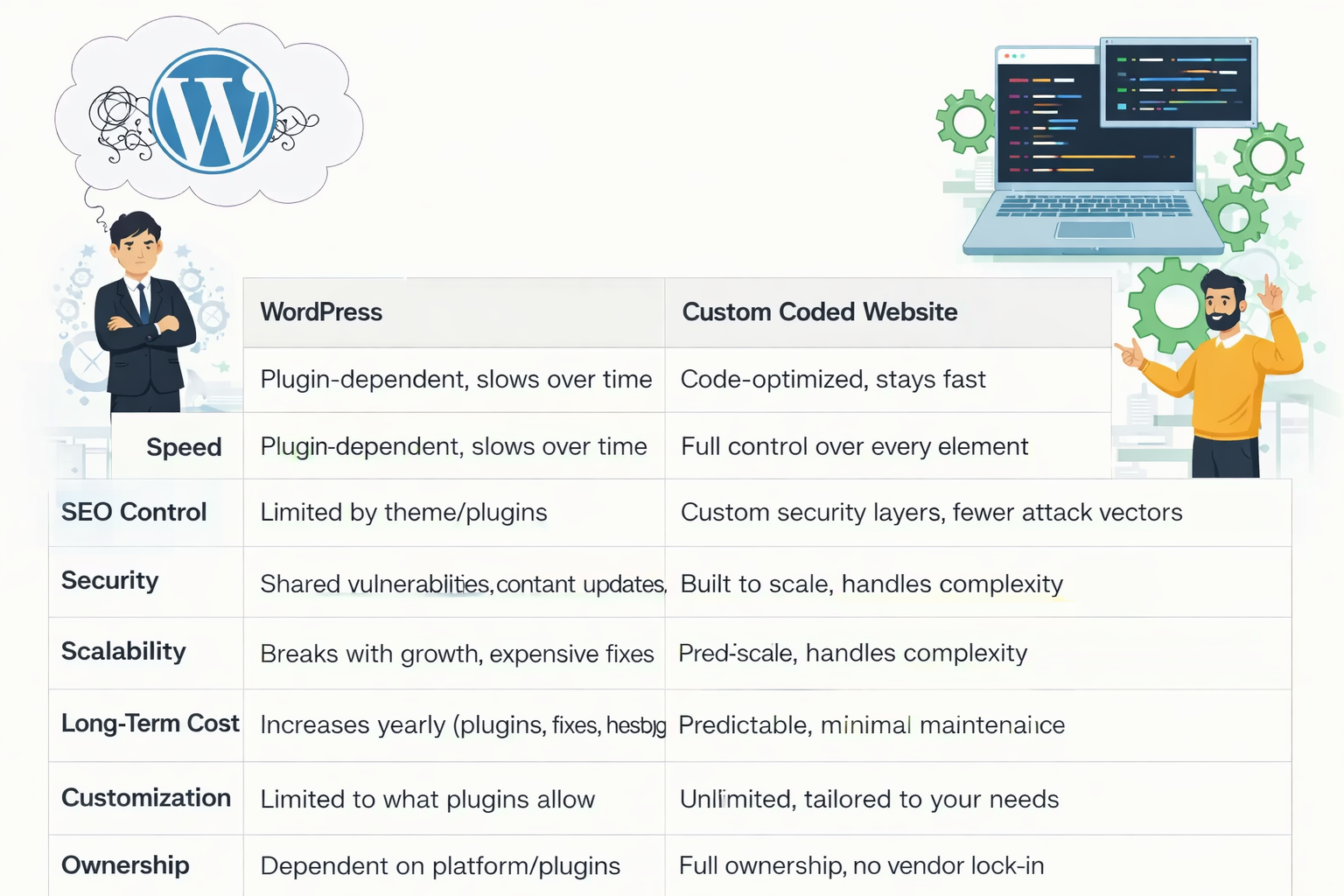
WordPress often works well at the start. Tailored systems usually perform better once the website becomes core infrastructure.
Who Should Choose Custom Coded Websites
Custom development is not necessary for every project. Blogs, portfolios, and simple marketing sites often run perfectly fine on WordPress for years.
Businesses that tend to outgrow it include:
- SaaS platforms with user dashboards
- Real estate portals with complex filtering
- High-traffic service platforms
- Logistics and operations-heavy companies
When uptime, performance, and integrations directly affect revenue, platform limitations become business risks.
Hiring the Right Custom Web Development Partner in Ahmedabad
Choosing the right team matters more than choosing the technology.
When evaluating developers, focus less on tools and more on how they think.
Questions Worth Asking
- Can you show before-and-after performance benchmarks?
- How do you plan for traffic growth without endless hosting upgrades?
- What does post-launch support actually include?
- Can you explain technical decisions without hiding behind jargon?
Strong teams discuss goals and constraints before discussing frameworks.
Red Flags to Watch For
Be cautious if you hear:
- “We use the same setup for every project.”
- “Custom systems are unnecessary” without analysis
- No discussion of performance metrics or architecture
Teams that ask hard questions early usually build more stable systems later.
Migrating From WordPress to a Custom Coded Website
Migration does not have to be disruptive if planned properly.
A solid migration focuses on structure first, design second.
When Migration Makes Sense
Migration is worth considering when:
- Traffic growth causes slowdowns or outages
- Feature limitations block revenue
- Downtime affects leads or sales
At that stage, staying often costs more than moving.
What the Migration Process Looks Like
A structured approach usually includes:
Audit
Identify what works, what fails, and what must change.
Architecture Planning
Design systems around real workflows and integrations.
Phased Rollout
Migrate content carefully, preserve SEO, and launch without traffic loss.
The goal is improvement, not duplication.
Why Businesses Choose Custom Website Development in Ahmedabad
Many growing companies prefer working with local teams for long-term accountability.
Clear communication, faster iteration, and shared context matter when the website supports real operations.
If your site has become critical infrastructure rather than a simple online presence, it may be time to rethink the platform behind it.
Talk to us: Call +91-7990402535 or book a free consultation to discuss your project.